About Scanfront 400
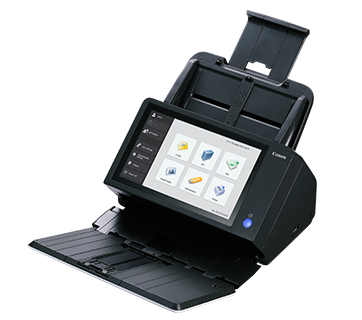
This high-performance standalone network scanner that delivers - no PC is required
Designed to take the central role in decentralized scanning, ScanFront 400 offers high speed coupled with reliable feeding mechanism to boost efficiency.
Efficient High-Speed ScanningThe Scanfront 400 increases productivity with its rapid scanning speed of up to 45 pages per minute. Its duplex auto document feeder enables simultaneous scanning of both sides of a document, handling up to 60 sheets in one go. This capability streamlines large batch digitization, making it ideal for high-volume office environments.
Advanced Security and ConnectivityWith robust security features like user authentication, SSL encryption, and password protection, the Scanfront 400 keeps confidential documents safe. Comprehensive network protocol support, including TCP/IP, SMB, FTP, WebDAV, and SMTP, allows seamless integration into business networks and easy file sharing or email distribution directly from the device.
User-Friendly Touchscreen InterfaceThe 8.4-inch WVGA TFT touchscreen ensures intuitive operation, simplifying navigation through functions and settings. Its multilingual user interface caters to diverse workforces, enhancing accessibility. Versatile scanning modesblack and white, grayscale, or coloralong with support for various file formats, provide flexible options to meet different business needs.
FAQs of Scanfront 400:
Q: How does the Scanfront 400 handle double-sided documents?
A: The Scanfront 400 features a Duplex Auto Document Feeder (ADF) that allows it to scan both sides of a document automatically in a single pass, streamlining the digitization of double-sided paperwork and improving workflow efficiency.
Q: What security measures are integrated into the Scanfront 400?
A: This scanner offers advanced security with user authentication, SSL encryption, and password protection, ensuring secure access and safeguarding sensitive documents during the scanning and file transfer processes.
Q: When should I use the different scanning modes available on the Scanfront 400?
A: Select Black & White mode for text documents, Grayscale for forms or documents with shades, and Color for visually rich materials. These options let you optimize file size and quality based on your documents requirements.
Q: Where can the scanned documents be sent using the Scanfront 400?
A: With its broad network protocol support (TCP/IP, SMB, FTP, WebDAV, and SMTP), the Scanfront 400 can send scanned files directly to network folders, FTP servers, web-based storage, or via email, enabling efficient digital workflow integration.
Q: What are the benefits of the 8.4-inch touchscreen on the Scanfront 400?
A: The large WVGA TFT touchscreen provides an intuitive, multilingual interface, making it easy for users to access scanning functions, customize settings, and preview documents, which enhances overall user experience and minimizes training time.
Q: How do I connect the Scanfront 400 to my office network?
A: The scanner can be integrated into network environments via its built-in 10Base-T/100Base-TX/1000Base-T (LAN) Ethernet interface. Configuration is straightforward using the touchscreen, allowing seamless document sharing across your organization.
 Send Inquiry




 Send Inquiry


 Send Inquiry


